Fork
CONDITIONAL / BRANCHING — *chooses a path based on what's true right now.*
Listen along — Fork
Loading audio…
Press play to listen along. The line being read lights up as you go.
Show full transcript
Loading transcript…
Chapter 2 — Fork and the Two-Path Decision
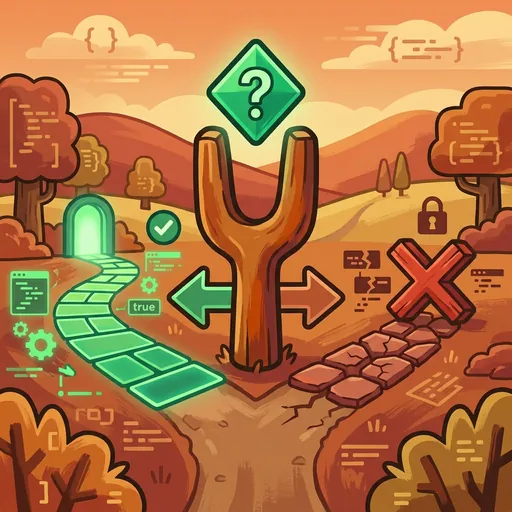
Loop held up a small, painted wooden figure. It wasn’t an animal. It wasn’t a person. It was a simple, abstract shape: a fork in a path. Above the fork, a tiny diamond shimmered, and two distinct arrows pointed away from it. One arrow curved to the left. The other swept to the right.
“This is Fork,” Loop announced to the class. Her voice was calm, steady, and held a hint of something important. “Fork isn’t a decision-maker. Fork is a branch-point.”
The children leaned forward. Fork looked like something from a board game, maybe a piece that told you where to go next. But Loop rarely introduced anything without a deeper purpose.
“The diamond above Fork,” Loop explained, pointing with a long, thin stick, “holds a condition. Think of it as a question. A question that can only be answered with ‘yes’ or ‘no.’ True or false.”
She paused, letting that sink in. “If the condition in the diamond is true,” she continued, “you follow the path of the first arrow. If it’s false, you follow the other path.”
This was the essence of conditional / branching. It was the fundamental way programs decided what to do next. It was the if/else statement, the very foundation of how a computer program controlled its own flow. It wasn’t about making choices; it was about following a pre-set logic.
Loop moved to a large whiteboard. She drew a simple diagram, mirroring Fork’s shape. “Imagine we’re building a program to decide what to wear,” she said. “Our condition, our ‘if’ question, could be: Is it raining outside?”
She wrote: if (Is it raining outside?):
Then, under the first arrow: Wear a raincoat.
And under the second: else: Wear a light jacket.
“See?” Loop gestured to the board. “The program doesn’t think about rain. It just checks the condition. If the answer is true, it follows the ‘raincoat’ path. If false, it follows the ‘light jacket’ path.”
A girl named Maya raised her hand. “So, the program doesn’t choose? It just does what it’s told?”
“Exactly,” Loop confirmed. “It’s not a decision-maker. It’s a branch-point. It executes one set of instructions if a condition is true, and a different set if it’s false.”
Loop then introduced the types of conditions Fork could handle. “Conditions always evaluate to TRUE or FALSE,” she reiterated. “This is called a Boolean output. Like a light switch: on or off. No in-between.”
She wrote examples on the board:
Is my name Alex?(True or False)Is the sky blue?(True or False)
“We often use specific symbols for these conditions,” Loop explained. “For equality, checking if two things are the same, we use ==.” She wrote: if (my_score == 10):
“This asks, ‘Is my score exactly ten?’” she clarified. “Not ‘greater than ten,’ not ‘less than ten.’ Just ‘is it ten?’”
Then she showed inequality: !=. “This means ‘not equal to.’ So, if (my_score != 10): would mean ‘if my score is anything other than ten.’”
The class seemed to grasp this quickly. It felt like solving a riddle.
Next came greater than and less than: < and >.
if (temperature > 70): (Is the temperature higher than seventy?)
if (age < 12): (Is the age younger than twelve?)
“These are common conditions,” Loop said. “But sometimes, you need to check more than one thing at once.”
She introduced combining conditions using AND and OR. “Imagine you want to go to the park,” she proposed. “You need two things to be true: if (it's sunny AND it's warm): then go to the park. Both parts must be true for the ‘go to the park’ path to activate.”
“What if only one thing needs to be true?” a boy named Sam asked.
“Good question, Sam,” Loop replied. “That’s where OR comes in. if (I like pizza OR I like tacos): then order takeout. If you like pizza, great. If you like tacos, also great. If you like both, even better! Only one needs to be true.”
The complexity grew, but Loop kept the examples concrete. She showed how to create nested conditionals, an if statement inside another if.
“Let’s go back to our weather example,” she said, drawing again.
if (Is it sunny?):
if (Is it warm?):
Go to the beach.
else: (meaning, it’s sunny but NOT warm)
Go for a walk in the park.
else: (meaning, it’s NOT sunny)
Stay inside and read a book.
“This builds up complex branching,” Loop noted. “You can make very specific paths depending on multiple conditions.” The children watched, seeing how a simple ‘yes’ or ‘no’ could lead to many different outcomes.
Finally, Loop touched on multi-way branches, like match/switch statements. “Sometimes you have many possible outcomes, not just two,” she explained. “Instead of a long chain of if-else if-else if, we can use something like a ‘switch’ to make it cleaner.”
She gave an example. “Imagine a program that decides what game to play based on a color you pick.”
switch (color_choice):
case 'red': Play a racing game.
case 'blue': Play a puzzle game.
case 'green': Play an adventure game.
default: Play a random game.
“The program checks your color_choice,” Loop clarified. “It matches it to one of the ‘cases’ and follows that path. If none match, it goes to the ‘default’ path.”
“The important thing,” Loop concluded, holding up Fork again, “is that the condition must be checked at runtime. ‘Runtime’ just means ‘when the program is actually running.’ Different inputs, different answers to the condition, will send the program down different paths.”
She placed Fork on her desk. “Fork is the conditional. If a thing is true, go this way. If not, go that way. Programs branch based on conditions. Not a decision-maker; a branch-point.” She looked around the room. “Not hard. Branch based on condition. If true, this way. If false, that way.”
The silence in the room wasn’t confusion. It was the quiet hum of understanding, of seeing how simple questions could build complicated, useful systems.
The CodeRealm ensemble
Fork is part of CodeRealm's distributed-narrative cast. Each character embodies a different curricular primitive; together they teach the full subject.
-

Stash
Variable / storage — the labeled box that holds a value until you call for it
-
Trek
Loop / iteration — keeps going around until the work is done
-

Module
Function / encapsulation — does one job well and can be called anywhere
-

Glitch
Debugging / inspection — finds bugs gently, never shaming; 'there's always a reason'
-

Order
Sequence / syntax — reminds you that order matters in code
-

Row
A list: many values lined up in a numbered row, so you can grab item number three instantly or walk through them one by one.
-

Port
Input and output: the doorway that brings information in from the world (a key press, a sensor) and sends results back out.
-
Ping
An event: a waiting bell that does nothing until its trigger happens, then runs its code the instant it is struck.
-

Shuffle
Randomness: a fresh unpredictable value each time — a dice roll, a shuffled deck — so a program can surprise, vary, and stay fair.